









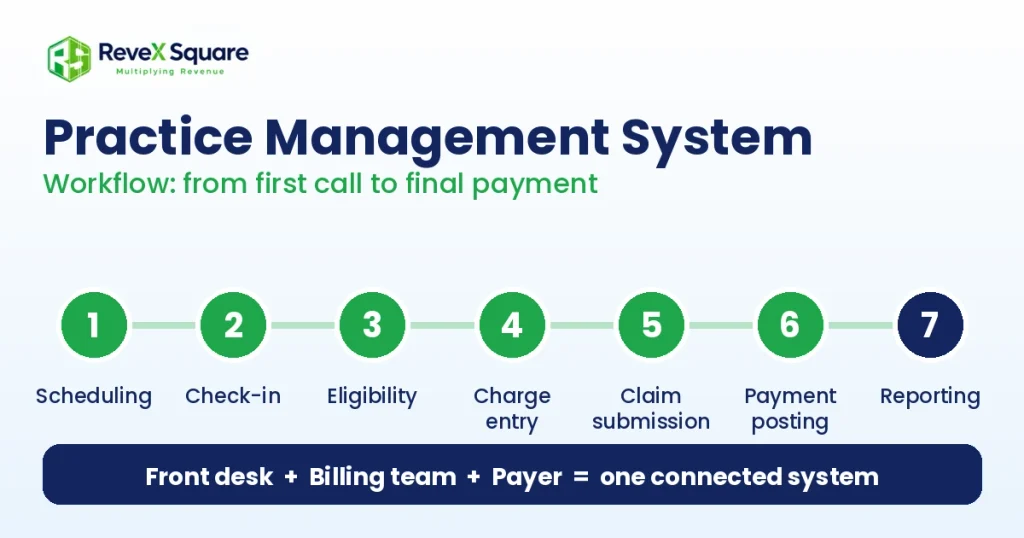
A practice management system (PMS) is software that runs the administrative and financial side of a medical practice. It handles scheduling, patient registration, insurance verification, charge entry, claim submission, payment posting, and reporting. An EHR stores the clinical record. The right PMS keeps the schedule full and the claims moving.
Most practices don’t struggle because they lack patients. They struggle because the work between the visit and the payment keeps breaking: a missed eligibility check, a claim with the wrong code, a denial nobody follows up on.
That pressure shows up in the research. In the AMA Physician Practice Benchmark Survey, inadequate payment rates, costly resources, and burdensome administrative requirements were the long-standing reasons practices gave for selling to hospitals, private equity firms, or insurers. Software won’t fix payment rates, but it removes a lot of the administrative drag.
The market reflects that need. Grand View Research valued the U.S. practice management system market at $5.89 billion in 2024 and projects it will reach $13.70 billion by 2033, growing about 10% a year.
This guide explains what a PMS does, how it differs from an EHR, what it costs, and how to choose one you won’t regret in six months.
What is a practice management system?
A practice management system is healthcare software that manages the daily operations and billing of a medical practice. It connects your front desk, your billing team, and the insurance payer. A patient books a visit, the system records insurance details, the provider documents the care, and the system turns that visit into a claim and tracks the payment.
Medical offices, dental practices, behavioral health groups, physical therapy clinics, and multi-specialty groups all use one. You may also hear it called practice management software, a PM system, or a PMS. They mean the same thing.
Practice management system vs. EHR: what’s the difference?
People mix these up all the time. Both hold patient data, but they solve different problems.
| Question | PMS | EHR |
|---|---|---|
| Main job | Operations and revenue | Clinical documentation and care |
| Typical users | Front desk, billing team, practice manager | Providers, nurses, clinical staff |
| Core data | Demographics, insurance, appointments, charges, claims, payments | Diagnoses, notes, orders, results, medications |
| Key output | Clean claims and financial reports | Patient chart and care record |
| Question it answers | “Did we get paid?” | “What care did the patient receive?” |
Many vendors sell both in one platform. Others sell them separately and connect them through an interface. If you already use an EHR, check which system works with it before you shop.
What does a practice management system do?
Here are the core functions, in the order a patient moves through your practice.
| Function | What happens | Why it matters |
|---|---|---|
| Scheduling | Books visits, manages provider calendars, sends reminders | Fewer gaps and no-shows |
| Patient registration | Captures demographics and insurance once | Fewer data-entry errors |
| Eligibility verification | Checks coverage before the visit | Prevents denials for inactive coverage |
| Charge capture | Turns documented services into billable codes | Stops missed revenue |
| Claim submission | Scrubs claims and sends them to payers through a clearinghouse | Faster, cleaner payment |
| Payment posting | Applies ERAs and patient payments to accounts | Accurate balances |
| Patient billing | Sends statements and takes online payments | Faster patient collections |
| Denial and A/R worklists | Flags rejected and unpaid claims | Nothing gets lost |
| Reporting | Tracks days in A/R, denial rate, and collections | You spot problems early |
Eligibility checks deserve extra attention. A visit billed to inactive coverage is a denial waiting to happen. If your front desk can’t keep up, our eligibility verification services handle the checks before patients arrive.
What are the benefits of a practice management system?
- One source of truth. Scheduling, insurance, and billing data live in one place, not in three spreadsheets.
- Cleaner claims. Built-in edits catch missing data and invalid codes before the payer does.
- Faster payment. Electronic claims and ERAs move money faster than paper.
- Less manual work. Your team stops retyping the same patient details.
- Clear visibility. Reports show where revenue stalls, by payer, provider, and code.
- Stronger security. Role-based access and audit logs support your HIPAA safeguards.
Cloud-based vs. on-premise practice management software
| Factor | Cloud-based | On-premise |
|---|---|---|
| Setup | Vendor hosts it; faster start | You buy servers and install the software |
| Cost model | Monthly subscription | License plus hardware and IT support |
| Updates | Automatic | Scheduled and managed by your IT team |
| Access | Any secure device | Office network, or VPN for remote work |
| Backups | Handled by the vendor | Your responsibility |
| Best for | Most small and mid-size practices | Practices with IT staff and strict local-control needs |
Most new buyers choose cloud. Whichever you pick, your vendor needs to sign a business associate agreement. You can review your obligations on the HHS HIPAA page.
How much does a practice management system cost?
Prices vary by vendor, specialty, and practice size, so published averages often mislead. Request written quotes and compare the total cost, not the headline rate.
| Pricing model | How it works | Watch for |
|---|---|---|
| Per provider, per month | A subscription for each clinician | Extra fees for non-provider users |
| Percentage of collections | You pay based on revenue | Costs climb as you grow |
| Flat monthly fee | Fixed price for a set scope | Limits on users or claim volume |
| License plus maintenance | One-time on-premise purchase | Hardware, upgrades, and support contracts |
Ask about these costs before you sign:
- Setup and data migration
- Staff training
- Clearinghouse fees
- Patient portal, e-prescribing, and texting add-ons
- EHR interface fees
- Premium support tiers
- Cancellation and data export fees
How to choose a practice management system
- List what your specialty needs. An orthopedic group and a behavioral health clinic bill very differently. Check how the system handles your most common codes. Our specialties page shows how billing needs differ.
- Confirm EHR integration. Ask whether patient and charge data flow both ways without re-entry.
- Test a real workflow. Don’t judge a demo. Ask the vendor to run one of your actual claims from scheduling to payment.
- Review the reports. You want days in A/R, denial rate by payer, and collections by provider without a custom request.
- Verify security. Look for a signed BAA, encryption, multi-factor login, and audit logs.
- Check support and training. Find out who answers the phone, during which hours, and how onboarding works.
- Read the contract. Look at the term length, your right to export data, and the cost of leaving.
Common mistakes when buying practice management software
Buying on demo polish. A smooth demo uses clean data. Your real claims are messier.
Ignoring data migration. Old patient records, fee schedules, and payer lists need cleanup before they move. Dirty data creates dirty claims.
Skipping staff training. Front desk and billing staff use different screens. Train each role on its own workflow.
Assuming software replaces billing expertise. The system sends claims. It does not call a payer or write an appeal.
Not planning for growth. Check whether the pricing and features still fit when you add a provider or a location.
Does a practice management system replace a billing company?
No. A PMS makes claims easier to build, send, and track. It does not argue medical necessity, chase a stalled payer, or appeal an underpayment. Those jobs need trained people.
That’s where a billing partner fits. Our medical billing services start at 2.75% of collections, and you can see the details on our pricing page. We also run denial management, accounts receivable follow-up, and full revenue cycle management alongside the system your practice already uses. Want to see where your revenue leaks? Request a free audit.
How to implement a practice management system
- Name one owner. A practice manager should own the project and decisions.
- Clean your data. Remove duplicate patients, fix payer lists, and confirm fee schedules.
- Set up payers and the clearinghouse. Complete enrollment for claims and ERAs before go-live.
- Train by role. Teach the front desk, billers, and providers separately.
- Go live on a lighter week. Fewer patients mean fewer problems during the switch.
- Review reports weekly for 90 days. Watch rejections, denials, and days in A/R.
Where practice management software is heading
- Cloud as the default. Vendors now build for browsers and mobile devices first.
- More automation. Batch eligibility checks, claim scrubbing, and patient self-scheduling take over repetitive tasks.
- Payer connectivity. The CMS Interoperability and Prior Authorization Final Rule requires many payers to build prior authorization APIs, with a compliance date of January 1, 2027. Systems that connect to those APIs will save staff time.
Frequently asked questions about practice management systems
What is a practice management system in healthcare?
A practice management system is software that runs the administrative and financial side of a medical practice. It handles scheduling, patient registration, insurance verification, charge entry, claim submission, payment posting, and reporting. Medical, dental, behavioral health, and therapy practices all use one.
What is the difference between a practice management system and an EHR?
A PMS manages operations and revenue, while an EHR stores clinical records such as notes, orders, and results. The first answers whether you got paid. The second answers what care the patient received. Many vendors bundle both, and others connect them through an interface.
What does a practice management system do?
It books appointments, collects patient and insurance data, checks eligibility, turns visits into billable charges, sends claims to payers, posts payments, bills patients, and tracks denials and reports. In short, it covers everything between a patient calling your office and your practice getting paid.
How much does a practice management system cost?
Cost depends on the vendor, your specialty, and your number of providers. Most cloud systems charge a monthly fee per provider, while others charge a flat fee or a percentage of collections. Ask for a written quote that lists setup, training, clearinghouse, integration, and support fees.
Is a practice management system HIPAA compliant?
Practice management software can support HIPAA compliance, but software alone does not make your practice compliant. Look for a signed business associate agreement, encryption, role-based access, multi-factor login, and audit logs. Your staff training and internal policies still matter.
Do small practices need practice management software?
Yes, in most cases. Even a solo practice has to schedule patients, verify coverage, send claims, and track payments. It replaces spreadsheets and paper logs, which cause missed charges and lost claims as patient volume grows.
Can PMS software reduce claim denials?
It can help. Built-in eligibility checks and claim scrubbing catch common errors before submission, such as missing data and invalid codes. A system cannot argue medical necessity or appeal a denial for you, so most practices pair it with trained billing staff or a billing partner.
How does practice management software submit claims to insurance?
It builds an electronic claim from the visit data and sends it to the payer through a clearinghouse. The payer returns acceptance reports and, later, an electronic remittance advice (ERA). The system uses the ERA to post payments and flag denials.
What is the difference between cloud-based and on-premise practice management software?
Cloud-based software runs on the vendor’s servers, so you pay a subscription and get automatic updates and backups. On-premise software runs on servers you own, which means upfront hardware costs and your own IT upkeep. Most small and mid-size practices choose cloud.
How long does it take to implement a practice management system?
Plan for several weeks to a few months. The timeline depends on practice size, how much patient data you migrate, and how many payers and interfaces you set up. Clean your data first and train staff by role to avoid delays.
Should I outsource billing if I already have a practice management system?
Many practices do. The software sends and tracks claims, but people still have to work denials, follow up on aging claims, and appeal underpayments. A billing partner handles that work inside the system you already use, which frees your front desk to focus on patients.
The bottom line
A practice management system won’t fix a broken process on its own. Pick one that fits your specialty, works with your EHR, and gives you reports you will actually read. Then back it with people who work the denials and chase the payers.
Ready to tighten your revenue cycle? Book a consultation with the Revex Square team.